Installation
Video Maker is not signed with an Apple Developer ID (it costs USD 99 a year and this app is given away for free), so macOS asks for one extra step the first time you open it. After that first step, it opens normally.
Important: move the "Video Maker" icon to the Applications folder BEFORE opening it for the first time. If you open it straight from the mounted .dmg or from Downloads, macOS may run it from a hidden temporary copy ("App Translocation") and some things will not behave. Dragging it to Applications first avoids all of that.
-
Download the .dmg and mount it
Use the download button on the home page. Double-click the downloaded
.dmgfile — a window opens with the "Video Maker" icon. -
Drag the icon to Applications
In that same window, drag "Video Maker" onto the shortcut to the "Applications" folder. This installs it and avoids App Translocation (see above).
-
Open "Video Maker" from Applications (or Launchpad) — first dialog
Double-click it. A dialog like this one appears, with a single button:
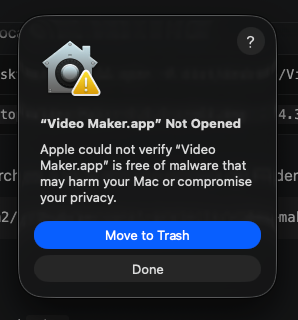
Do NOT click "Move to Trash". Click "Done" and go on to the next step — this dialog has no button to open the app anyway, you need to go to System Settings.
-
System Settings → Privacy & Security → "Open Anyway"
Open System Settings → Privacy & Security. Scroll down to the "Security" section: you will see a message saying that "Video Maker" was blocked. Click "Open Anyway".
-
Confirm with Touch ID or your password
macOS asks for a confirmation (fingerprint or your user password) and then shows a second dialog with an "Open" button. Confirm there and the app starts.
-
From then on it opens directly
macOS remembers this approval per path and per version: you will not have to repeat it unless you install a new version of the .dmg.
Terminal alternative
If you would rather not touch System Settings, with the app already in Applications you can remove the quarantine flag yourself from Terminal:
xattr -dr com.apple.quarantine "/Applications/Video Maker.app"Then open it normally, double-clicking it in Applications.